


Peerspace: Unique Event Spaces
4.7142.00 Reviews
App Specs
- Version
- 3.13.6
- Updated On
- License
- Free
- Downloads
- 100,000+
- Developer
- Peerspace
- Categories
- Events
- Platform
- Android
Screenshots


 Analysis by AppCompare
I find Peerspace most useful when a venue needs to do more than simply hold people. A meeting, a small gathering, and a photo shoot can call for very different surroundings, and choosing a room by appearance alone can lead to awkward surprises. This app gives me a way to explore spaces with a specific occasion in mind, then narrow the search before I commit to contacting a host. The experience is shaped by that process: browsing is easy to begin, but making a sound choice still takes attention and a reliable connection.
Where a live connection matters
Searching for a space is the first network-dependent moment. Listings, photos, availability, and host conversations are most useful when the app can load current information, so I treat venue research as something to do when I have a steady connection rather than in the middle of a rushed commute. A venue can look promising in a thumbnail, but I want to inspect its images and details carefully before deciding whether it fits the event.
The other important moment is coordination. Availability can change, and a question about setup, access, or the intended use of a space is better answered directly by the host than guessed from a photo. I would avoid treating a listing as a final confirmation until the booking details are clear. If timing is tight, I’d start the conversation early and leave room for a reply instead of assuming that a quick search means the venue is ready to use.
Using it between errands and site visits
Peerspace suits the practical rhythm of planning: I can shortlist possibilities at home, revisit a location while discussing it with a colleague, and use the app to keep the venue search connected to the event’s actual needs. For a photo shoot, for example, I’d compare the overall look of a space with the practical questions that affect the day, such as whether the room seems suitable for the planned equipment and how the host describes its use. For a meeting, I’d focus less on dramatic photos and more on whether the location and listed details match the group’s purpose.
A useful habit is to search with a short brief in mind before opening listings: event type, approximate group size, preferred area, and the features that are truly essential. Then I’d separate “must have” requirements from nice extras. That makes it easier to compare options rather than letting an attractive interior distract me from a mismatch. It also makes host messages more focused, which can save time for both sides.
When the app or connection gets in the way
Venue planning often involves several people and multiple decisions, so I wouldn’t rely on a single browsing session as the whole plan. If a page is slow to load or a conversation is interrupted, I’d return to the key details and confirm them before moving ahead. A sensible recovery routine is to keep the event brief and candidate venue names somewhere accessible, then reopen the app when the connection is stable. That way, a temporary interruption doesn’t force me to reconstruct the search from memory.
I’d also distinguish between finding a possible venue and having a settled plan. A promising result is only a starting point: the event date, expectations, and any special requirements still need careful coordination. This matters especially for a time-sensitive booking, where a delay in checking messages can create uncertainty. Peerspace can help organize the search, but it doesn’t remove the need to read details closely and communicate clearly.
Worth Reading Before You Choose

EA SPORTS FC Mobile 26 Is a Bigger Football Game, but It Takes Time

Flipboard Shows What News Apps Must Do Beyond the Feed

Switching to Android Auto Means Rethinking Your Driving Routine

Google Calendar Makes a Crowded Week Easier to Manage

Ludo King Makes the Most of the Minutes Between Plans

Baby Panda World Brings Quick Play to Modern Phones, but Its Game Library Feels Busy
Keeping browsing focused
Venue photos can encourage a long browsing session, and that’s part of the appeal, but it is easy to spend time comparing attractive spaces that do not meet the brief. I get more value by narrowing the search first and reviewing a smaller set of plausible matches. If I’m watching mobile data use, I’d save the deeper image-by-image comparison for a reliable connection and avoid repeatedly opening the same listings without a decision in mind.
There’s also a trade-off between speed and certainty. Broad browsing is good for discovering unexpected options; a tightly defined search is better when the date is close or the event has non-negotiable needs. I’d use the exploratory approach early, then become more selective as plans firm up. That shift helps keep the app useful rather than turning venue research into endless scrolling.
Discovering the Perfect Space
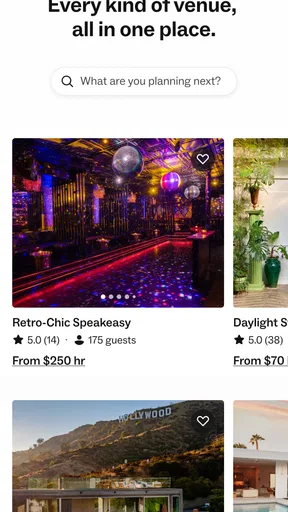
So, what's the deal with Peerspace? Picture this: you're scrolling through a curated marketplace filled with thousands of spaces just begging to host your next event. From chic lofts in downtown areas to rustic barns in the countryside, Peerspace lets you explore a variety of venues to fit your vibe. The app’s intuitive interface guides you through a seamless browsing experience, making it easy to filter by location, capacity, amenities, and more.
A User-Friendly Experience
Let’s talk about usability. The app is designed with the user in mind, boasting a clean, modern look that’s as inviting as the spaces it showcases. Navigating through Peerspace is a breeze, thanks to its straightforward categories and clear descriptions. The search function is robust, allowing you to quickly zero in on spaces that meet your specific needs. And, if you’re like me and enjoy a good visual, the high-quality photos give you a real sense of each location’s vibe.
Booking Made Easy
One of the standout features is the booking process. It’s refreshingly simple. Once you've found "the one," you can easily check availability, communicate with hosts, and book your space all through the app. The integrated calendar system helps you avoid any scheduling snafus, ensuring that your event is as stress-free as possible. Plus, the app offers flexible booking options, which is a real lifesaver for last-minute planners.
Choosing the right venue, not just the best photo
For a realistic example, imagine I need a quiet place for a planning meeting after work. I’d first set the area and group size, then compare a few spaces rather than choosing the first polished interior. Before booking, I’d message the host with the practical questions that affect our evening: whether the planned arrangement suits the room, what we should expect on arrival, and whether the timing works. That small check is more valuable than guessing from pictures, and it gives me a clearer basis for sharing a choice with the rest of the group.
This is where Peerspace differs from the usual alternatives. A general map search can help locate conventional meeting rooms, while asking friends may turn up a personal recommendation, but neither approach necessarily offers the same event-oriented browsing across distinctive spaces. On the other hand, if I only need a familiar hotel room or a basic office, a direct venue search may be quicker. Peerspace makes most sense when atmosphere and suitability matter together, not when the cheapest or most standard room is the only goal.
Who benefits most from this kind of search
I’d recommend it to people who plan occasional gatherings, creative shoots, workshops, or meetings and want more choice than a standard conference room. It can also help a small team compare settings before settling on one, especially when the look of the venue is part of the experience. The app is less compelling if you already have a dependable venue, need a space in a location with few suitable listings, or want to avoid coordinating with a host. In those situations, a familiar local option can be simpler.
One non-obvious planning tip is to use the search in two passes. First, explore broadly to learn what kinds of venues appear in the area; then return with a tighter brief and remove anything that misses a genuine requirement. I’d also compare the written details against the event plan before falling in love with the photos. A beautiful space that does not suit the group’s needs is still the wrong booking, however appealing it looks on a phone.
Costs, expectations, and the final check
The app is free to download, and it is rated for Everyone. That does not mean the venue itself is free: I’d review the booking details and any terms shown for the specific space before making a decision. Likewise, a strong visual match is not a substitute for confirming practical arrangements with the host. I find the platform most helpful as a discovery and coordination tool, not as a reason to skip the ordinary checks I’d make before arranging an event.
Peerspace is an Events app from Peerspace, with a 4.6 average from around 1.1 thousand ratings and over 100 thousand installs. It first appeared on August 29, 2022, and version 3.12.8 supports Android 7.0 and later. Those details offer context, but what matters day to day is whether its venue options fit the occasion and whether I’m willing to spend time comparing and confirming them.
Community and Support
Peerspace isn’t just about finding venues; it’s about building a community. The app fosters a connection between hosts and guests, allowing for personalized experiences. Hosts are typically responsive and eager to help you tailor the space to your event’s needs. Plus, Peerspace’s customer service is top-notch. If you hit a snag or have a question, their support team is just a tap away, ready to assist you with any hiccups along the way.
Why Choose Peerspace?
Okay, so I might be a little biased, but Peerspace really does make venue hunting exciting. It offers a level of convenience and variety that’s hard to beat. Whether you're planning something big or small, formal or casual, the app’s diverse listings have something to suit every taste and budget. It's like having a world of venues right in your pocket.
In conclusion, if you're in the market for a unique space for your next event, give Peerspace a try. It's a tool that not only simplifies the venue selection process but also opens up a world of possibilities. With its user-friendly interface, robust search features, and dedicated community, Peerspace is redefining how we think about event planning. So, go ahead, download the app, and start exploring. Your perfect venue is just a few taps away.
My connectivity verdict
Pros
- Easy to book unique venues.
- Wide range of venue options.
- User-friendly interface.
- Transparent pricing details.
- Instant booking confirmation.
Cons
- Limited customer support.
- Some venues may lack amenities.
- High demand affects availability.
- No in-app chat feature.
- Cancellation policy varies.
FAQs for Peerspace: Unique Event Spaces
What is Peerspace and how does it work?
Peerspace is a platform that allows users to discover and book unique venues for events, meetings, and productions. Users can browse a wide range of spaces, view photos and descriptions, and book directly through the app. It’s designed to simplify the process of finding and securing a venue by providing detailed listings and streamlined booking options.
Is Peerspace available in all locations?
Peerspace primarily operates in major cities across the United States, with a growing presence internationally. While the app continually expands its listings, availability can vary depending on your specific location. It’s recommended to check the app or website for current locations and venue options in your area.
What types of venues can I find on Peerspace?
Peerspace offers a diverse range of venues, including lofts, studios, galleries, rooftops, and more. Whether you’re planning a corporate meeting, a wedding, or a creative photo shoot, Peerspace provides options to suit various themes and capacities. Each listing includes detailed information to help you find the perfect space for your needs.
How does the booking process work on Peerspace?
Booking a venue on Peerspace is straightforward. Once you find a space you like, you can check availability, contact the host with any questions, and book directly through the app. Payment is handled securely, and you’ll receive confirmation and details for your event. Cancellations and changes can be managed within the app’s guidelines.
Are there any fees or costs associated with using Peerspace?
While browsing venues on Peerspace is free, booking a venue will involve costs set by the host, which can include hourly rates and any additional fees for amenities or services. Peerspace also charges a service fee. It’s important to review all costs associated with a booking to ensure it fits your budget.


